> ## Documentation Index
> Fetch the complete documentation index at: https://docs.suada.ai/llms.txt
> Use this file to discover all available pages before exploring further.
# SDKs Overview
> Choose the right SDK for your tech stack and get started with Suada
Suada provides official SDKs for multiple platforms and frameworks to help you integrate business analytics into your applications. Choose the SDK that best matches your tech stack:
## Available SDKs
### Frontend SDKs
Build interactive analytics interfaces in React applications
- React 18+ support
- Custom hooks
- LangChain integration
} href="/sdks/next">
Server-side rendering and App Router support
- Next.js 13+ support
- Server Components
- API route handlers
Create powerful analytics components in Angular applications
- Angular 17.3+ support
- Injectable services
- Standalone components
Integrate analytics seamlessly in Vue 3 applications
- Vue 3.0+ support
- Composition API
- Vite integration
Add analytics to your iOS and Android applications
- React Native 0.73+ support
- Native components
- Deep linking
Use Suada with plain JavaScript or any web framework
- Framework agnostic
- CDN support
- UMD/ESM formats
### Backend SDKs
Integrate with Node.js applications and LangChain agents
- Node.js 18+ support
- LangChain integration
- TypeScript support
Build analytics solutions with Python and LangChain
- Python 3.8+ support
- LangChain integration
- Type hints
## Quick Comparison
Choose the right SDK based on your needs:
| SDK | Best For | Key Features | Requirements |
| ------------ | ------------------------------- | -------------------------------------------- | ------------------ |
| React | Web applications using React | Component library, hooks, TypeScript support | React 18+ |
| Next.js | Server-side rendered React apps | Server Components, API routes, App Router | Next.js 13+ |
| Angular | Enterprise Angular applications | Injectable services, components, TypeScript | Angular 17.3+ |
| Vue | Vue.js applications | Composables, components, TypeScript | Vue 3.0+ |
| React Native | Mobile applications | Native components, deep linking support | React Native 0.73+ |
| Vanilla JS | Any web application | Framework agnostic, CDN support | Modern browsers |
| Node.js | Backend services, LangChain | LangChain integration, async support | Node.js 18+ |
| Python | Data analysis, LangChain | LangChain integration, type hints | Python 3.8+ |
## Core Features
### 🔒 OAuth Integration
All SDKs provide secure OAuth integration:
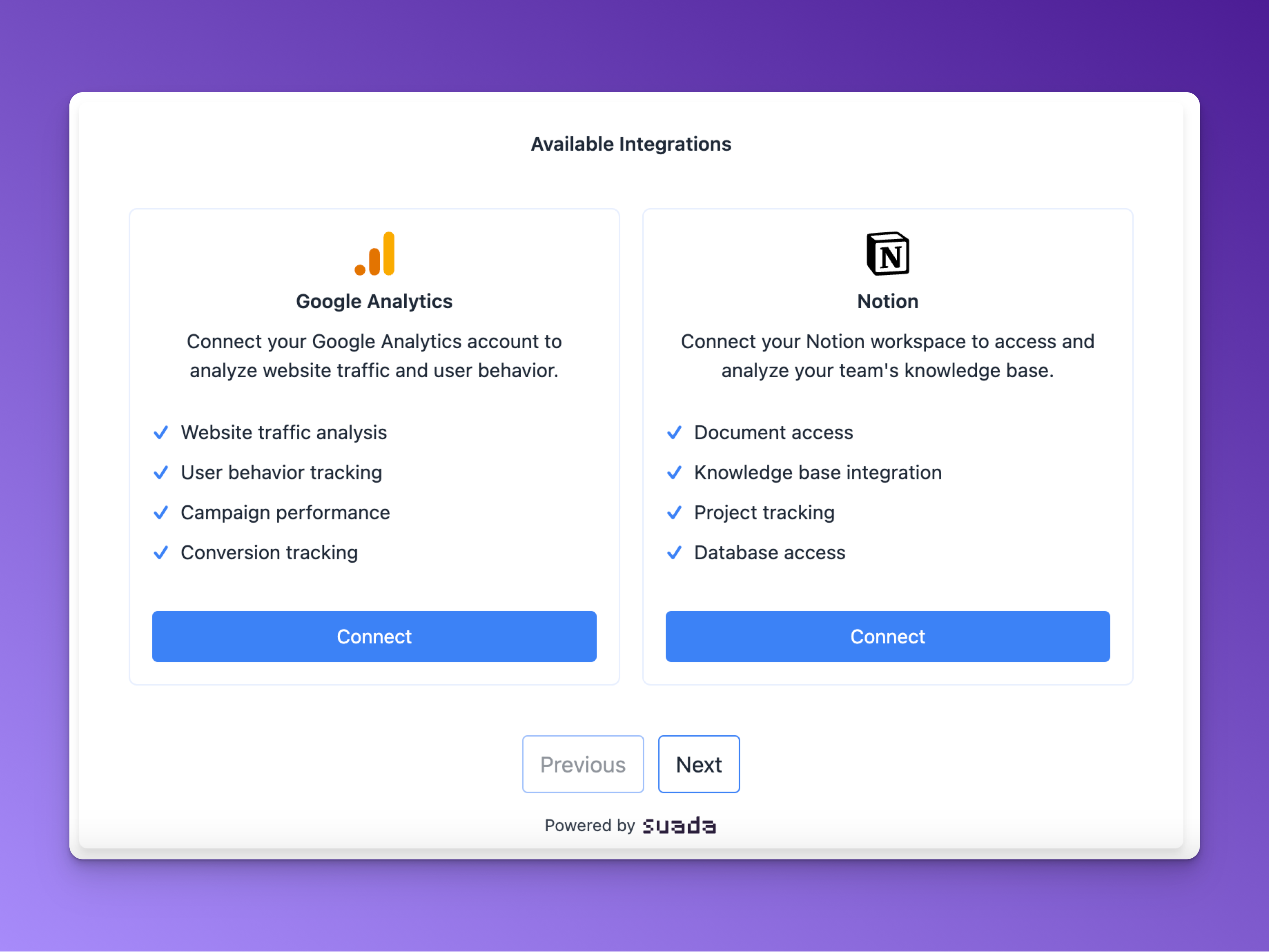 1. **Initialize Connection**
* User clicks connect button
* SDK handles OAuth redirect
* Secure token exchange
2. **Authorization**
* User authenticates with provider
* Secure callback handling
* Token management
3. **Integration Complete**
* Success confirmation
* Ready to use
### 🛠️ Common Features
All SDKs share these core features:
* **Type Safety**: Built-in TypeScript/type hints support
* **Error Handling**: Comprehensive error types and handling
* **API Consistency**: Similar patterns across all SDKs
* **LangChain Support**: Integration with LangChain (Node.js and Python)
* **Passthrough Mode**: Support for using with external user identifiers
## Getting Started
### Prerequisites
Before you begin, ensure you have:
* A Suada API key
* Node.js 16.0.0 or higher (for JavaScript/TypeScript SDKs)
* Python 3.8+ (for Python SDK)
* Your preferred package manager
### Installation
Each SDK can be installed via its respective package manager:
```bash npm theme={null}
# React/Next.js/Angular/Vue/React Native/Node.js
npm install @suada/[sdk-name] @suada/core
```
```bash pip theme={null}
# Python
pip install suada
```
### Environment Setup
Set up your environment variables based on your framework:
```env theme={null}
# React/Vue/Angular
VITE_SUADA_API_KEY=your-api-key
VITE_SUADA_BASE_URL=https://api.suada.ai
# Next.js
NEXT_PUBLIC_SUADA_API_KEY=your-api-key
NEXT_PUBLIC_SUADA_BASE_URL=https://api.suada.ai
# React Native
SUADA_API_KEY=your-api-key
SUADA_BASE_URL=https://api.suada.ai
# Node.js/Python
SUADA_API_KEY=your-api-key
SUADA_BASE_URL=https://api.suada.ai
```
### Basic Integration
1. **Install SDK**
```bash theme={null}
npm install @suada/react @suada/core
```
2. **Configure Provider**
```typescript theme={null}
import { SuadaProvider } from '@suada/react';
function App() {
return (
);
}
```
3. **Add Components**
```jsx theme={null}
```
## Best Practices
### Security
* Store API keys in environment variables
* Use HTTPS for all API calls
* Implement proper error handling
* Secure OAuth callback endpoints
* Validate user sessions
### Performance
* Initialize SDK instances once and reuse them
* Implement proper cleanup
* Handle offline scenarios
* Optimize network requests
* Use proper caching
### Development
* Use TypeScript/type hints when available
* Follow framework best practices
* Write unit tests
* Keep dependencies updated
* Use proper error boundaries
## FAQ
### How do I handle OAuth callbacks?
1. Set up your callback URL in the Suada dashboard
2. Configure the redirect URI in your component
3. Handle the callback in your application
```typescript theme={null}
// Example callback handler
const handleCallback = async (code: string) => {
try {
await suada.handleOAuthCallback(code);
// Handle success
} catch (error) {
// Handle error
}
};
```
### How do I manage user sessions?
1. Use the built-in session management
2. Implement proper cleanup
3. Handle token refresh
```typescript theme={null}
// Example session management
const { session, refreshToken } = useSession();
// Refresh token when needed
await refreshToken();
```
### How do I debug integration issues?
1. Enable debug mode
2. Check network requests
3. Validate OAuth flow
```typescript theme={null}
// Enable debug mode
const suada = new Suada({
debug: true,
logger: console.log
});
```
### How do I handle offline scenarios?
1. Implement proper error handling
2. Use retry mechanisms
3. Cache responses
```typescript theme={null}
// Example offline handling
const handleRequest = async () => {
try {
return await suada.request();
} catch (error) {
if (error.code === 'OFFLINE') {
// Handle offline scenario
}
}
};
```
## Support & Resources
### Documentation
* [API Reference](/api-reference)
* [Component Library](/components)
* [Integration Guides](/guides)
* [Framework Best Practices](/best-practices)
* [Performance Guide](/performance)
### Support
* Email Support: [hello@suada.ai](mailto:hello@suada.ai)
1. **Initialize Connection**
* User clicks connect button
* SDK handles OAuth redirect
* Secure token exchange
2. **Authorization**
* User authenticates with provider
* Secure callback handling
* Token management
3. **Integration Complete**
* Success confirmation
* Ready to use
### 🛠️ Common Features
All SDKs share these core features:
* **Type Safety**: Built-in TypeScript/type hints support
* **Error Handling**: Comprehensive error types and handling
* **API Consistency**: Similar patterns across all SDKs
* **LangChain Support**: Integration with LangChain (Node.js and Python)
* **Passthrough Mode**: Support for using with external user identifiers
## Getting Started
### Prerequisites
Before you begin, ensure you have:
* A Suada API key
* Node.js 16.0.0 or higher (for JavaScript/TypeScript SDKs)
* Python 3.8+ (for Python SDK)
* Your preferred package manager
### Installation
Each SDK can be installed via its respective package manager:
```bash npm theme={null}
# React/Next.js/Angular/Vue/React Native/Node.js
npm install @suada/[sdk-name] @suada/core
```
```bash pip theme={null}
# Python
pip install suada
```
### Environment Setup
Set up your environment variables based on your framework:
```env theme={null}
# React/Vue/Angular
VITE_SUADA_API_KEY=your-api-key
VITE_SUADA_BASE_URL=https://api.suada.ai
# Next.js
NEXT_PUBLIC_SUADA_API_KEY=your-api-key
NEXT_PUBLIC_SUADA_BASE_URL=https://api.suada.ai
# React Native
SUADA_API_KEY=your-api-key
SUADA_BASE_URL=https://api.suada.ai
# Node.js/Python
SUADA_API_KEY=your-api-key
SUADA_BASE_URL=https://api.suada.ai
```
### Basic Integration
1. **Install SDK**
```bash theme={null}
npm install @suada/react @suada/core
```
2. **Configure Provider**
```typescript theme={null}
import { SuadaProvider } from '@suada/react';
function App() {
return (
);
}
```
3. **Add Components**
```jsx theme={null}
```
## Best Practices
### Security
* Store API keys in environment variables
* Use HTTPS for all API calls
* Implement proper error handling
* Secure OAuth callback endpoints
* Validate user sessions
### Performance
* Initialize SDK instances once and reuse them
* Implement proper cleanup
* Handle offline scenarios
* Optimize network requests
* Use proper caching
### Development
* Use TypeScript/type hints when available
* Follow framework best practices
* Write unit tests
* Keep dependencies updated
* Use proper error boundaries
## FAQ
### How do I handle OAuth callbacks?
1. Set up your callback URL in the Suada dashboard
2. Configure the redirect URI in your component
3. Handle the callback in your application
```typescript theme={null}
// Example callback handler
const handleCallback = async (code: string) => {
try {
await suada.handleOAuthCallback(code);
// Handle success
} catch (error) {
// Handle error
}
};
```
### How do I manage user sessions?
1. Use the built-in session management
2. Implement proper cleanup
3. Handle token refresh
```typescript theme={null}
// Example session management
const { session, refreshToken } = useSession();
// Refresh token when needed
await refreshToken();
```
### How do I debug integration issues?
1. Enable debug mode
2. Check network requests
3. Validate OAuth flow
```typescript theme={null}
// Enable debug mode
const suada = new Suada({
debug: true,
logger: console.log
});
```
### How do I handle offline scenarios?
1. Implement proper error handling
2. Use retry mechanisms
3. Cache responses
```typescript theme={null}
// Example offline handling
const handleRequest = async () => {
try {
return await suada.request();
} catch (error) {
if (error.code === 'OFFLINE') {
// Handle offline scenario
}
}
};
```
## Support & Resources
### Documentation
* [API Reference](/api-reference)
* [Component Library](/components)
* [Integration Guides](/guides)
* [Framework Best Practices](/best-practices)
* [Performance Guide](/performance)
### Support
* Email Support: [hello@suada.ai](mailto:hello@suada.ai)