> ## Documentation Index
> Fetch the complete documentation index at: https://docs.suada.ai/llms.txt
> Use this file to discover all available pages before exploring further.
# Frontend SDKs Overview
> Pre-built UI components for managing integrations in your frontend applications
Suada provides official frontend SDKs with pre-built UI components to help you quickly add integration management to your applications. Choose the SDK that matches your frontend framework:
## Available Frontend SDKs
Modern React components with hooks and TypeScript support
- React 18+ support
- Custom hooks for state management
- Styled components integration
- LangChain integration
} href="/sdks/next">
Server-side rendering and App Router support
- Next.js 13+ support
- Server Components
- API route handlers
- Tailwind CSS integration
Enterprise-ready Angular components and services
- Angular 17.3+ support
- Injectable services
- Standalone components
- TypeScript support
Vue 3 components with composables
- Vue 3.0+ support
- Composition API
- TypeScript support
- Vite integration
Native mobile components for iOS and Android
- React Native 0.73+ support
- Deep linking support
- Native UI components
- Expo compatibility
Framework-agnostic JavaScript implementation
- No framework dependencies
- Modern browser support
- CDN availability
- UMD/ESM formats
## Getting Started
### Prerequisites
Before you begin, ensure you have:
* A Suada API key
* Node.js 16.0.0 or higher
* A modern web browser
* Your preferred package manager (npm, yarn, or pnpm)
### Installation
Choose your preferred SDK and install it:
```bash theme={null}
# React
npm install @suada/react @suada/core
# Next.js
npm install @suada/next @suada/core
# Angular
npm install @suada/angular @suada/core
# Vue
npm install @suada/vue @suada/core
# React Native
npm install @suada/react-native @suada/core
# Vanilla JS
npm install @suada/vanilla @suada/core
```
### Environment Setup
Set up your environment variables based on your framework:
```env theme={null}
# React/Vue/Angular
VITE_SUADA_API_KEY=your-api-key
VITE_SUADA_BASE_URL=https://api.suada.ai
# Next.js
NEXT_PUBLIC_SUADA_API_KEY=your-api-key
NEXT_PUBLIC_SUADA_BASE_URL=https://api.suada.ai
# React Native
SUADA_API_KEY=your-api-key
SUADA_BASE_URL=https://api.suada.ai
```
## Core Features
### 🔒 OAuth Integration Flow
The SDKs provide a seamless OAuth integration experience:
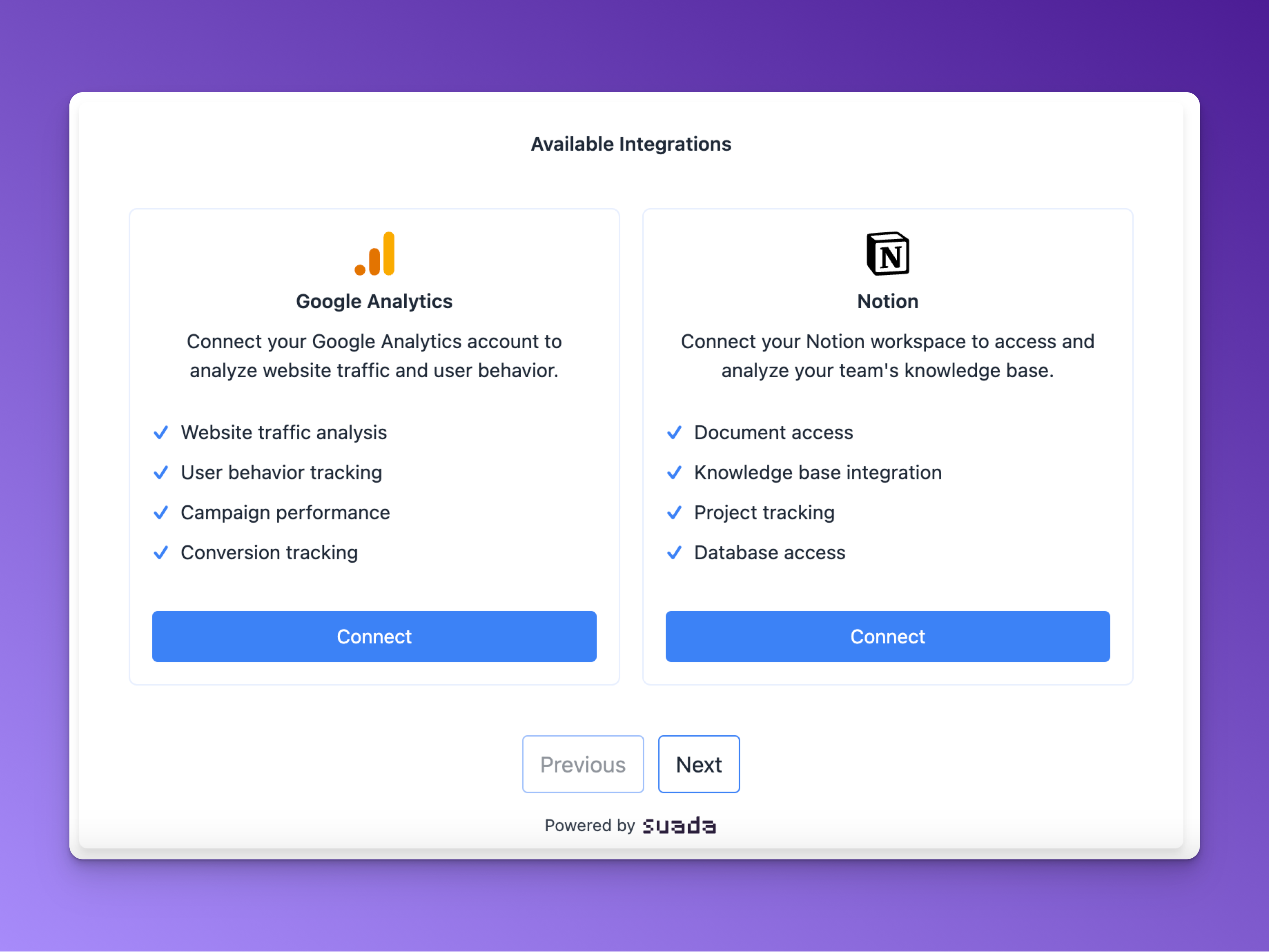 1. **Initialize Connection**
* User clicks connect button
* SDK handles OAuth redirect
* Secure token exchange
2. **Authorization**
* User authenticates with provider
* Secure callback handling
* Token management
3. **Integration Complete**
* Success confirmation
* Ready to use
### 🎨 UI Components
All SDKs provide these core components:
#### Integration Button
A customizable button for connecting services:
```jsx React theme={null}
Connect Notion
```
```tsx Next.js theme={null}
Connect Notion
```
```typescript Angular theme={null}
Connect Notion
```
```vue Vue theme={null}
Connect Notion
```
#### Integration List
Display and manage connected integrations:
```jsx React theme={null}
```
```tsx Next.js theme={null}
```
```typescript Angular theme={null}
```
```vue Vue theme={null}
```
## Best Practices
### Security
* Store API keys in environment variables
* Use HTTPS for all API calls
* Implement proper error handling
* Secure OAuth callback endpoints
* Validate user sessions
### Performance
* Lazy load components
* Implement proper cleanup
* Handle offline scenarios
* Optimize network requests
* Use proper caching
### Development
* Use TypeScript for type safety
* Follow framework best practices
* Write unit tests
* Keep dependencies updated
* Use proper error boundaries
## Common Use Cases
### Basic Integration Setup
1. **Install SDK**
```bash theme={null}
npm install @suada/react @suada/core
```
2. **Configure Provider**
```typescript theme={null}
import { SuadaProvider } from '@suada/react';
function App() {
return (
);
}
```
3. **Add Components**
```jsx theme={null}
```
## Framework-Specific Features
### Next.js
* Server Components support
* API route handlers
* App Router compatibility
* Tailwind CSS integration
### React
* Custom hooks
* Context API integration
* Styled components
* LangChain support
### Angular
* Injectable services
* Standalone components
* Dependency injection
* RxJS integration
### Vue
* Composition API
* Vite integration
* Vue Router support
* Pinia integration
### React Native
* Native UI components
* Deep linking
* Platform-specific optimizations
* Expo compatibility
## FAQ
### How do I handle OAuth callbacks?
1. Set up your callback URL in the Suada dashboard
2. Configure the redirect URI in your component
3. Handle the callback in your application
```typescript theme={null}
// Example callback handler
const handleCallback = async (code: string) => {
try {
await suada.handleOAuthCallback(code);
// Handle success
} catch (error) {
// Handle error
}
};
```
### How do I debug integration issues?
1. Enable debug mode
2. Check network requests
3. Validate OAuth flow
```typescript theme={null}
// Enable debug mode
const suada = new Suada({
debug: true,
logger: console.log
});
```
### How do I handle offline scenarios?
1. Implement proper error handling
2. Use retry mechanisms
3. Cache responses
```typescript theme={null}
// Example offline handling
const handleRequest = async () => {
try {
return await suada.request();
} catch (error) {
if (error.code === 'OFFLINE') {
// Handle offline scenario
}
}
};
```
## Support & Resources
### Documentation
* [API Reference](/api-reference)
### Support
* Email Support: [hello@suada.ai](mailto:hello@suada.ai)
1. **Initialize Connection**
* User clicks connect button
* SDK handles OAuth redirect
* Secure token exchange
2. **Authorization**
* User authenticates with provider
* Secure callback handling
* Token management
3. **Integration Complete**
* Success confirmation
* Ready to use
### 🎨 UI Components
All SDKs provide these core components:
#### Integration Button
A customizable button for connecting services:
```jsx React theme={null}
Connect Notion
```
```tsx Next.js theme={null}
Connect Notion
```
```typescript Angular theme={null}
Connect Notion
```
```vue Vue theme={null}
Connect Notion
```
#### Integration List
Display and manage connected integrations:
```jsx React theme={null}
```
```tsx Next.js theme={null}
```
```typescript Angular theme={null}
```
```vue Vue theme={null}
```
## Best Practices
### Security
* Store API keys in environment variables
* Use HTTPS for all API calls
* Implement proper error handling
* Secure OAuth callback endpoints
* Validate user sessions
### Performance
* Lazy load components
* Implement proper cleanup
* Handle offline scenarios
* Optimize network requests
* Use proper caching
### Development
* Use TypeScript for type safety
* Follow framework best practices
* Write unit tests
* Keep dependencies updated
* Use proper error boundaries
## Common Use Cases
### Basic Integration Setup
1. **Install SDK**
```bash theme={null}
npm install @suada/react @suada/core
```
2. **Configure Provider**
```typescript theme={null}
import { SuadaProvider } from '@suada/react';
function App() {
return (
);
}
```
3. **Add Components**
```jsx theme={null}
```
## Framework-Specific Features
### Next.js
* Server Components support
* API route handlers
* App Router compatibility
* Tailwind CSS integration
### React
* Custom hooks
* Context API integration
* Styled components
* LangChain support
### Angular
* Injectable services
* Standalone components
* Dependency injection
* RxJS integration
### Vue
* Composition API
* Vite integration
* Vue Router support
* Pinia integration
### React Native
* Native UI components
* Deep linking
* Platform-specific optimizations
* Expo compatibility
## FAQ
### How do I handle OAuth callbacks?
1. Set up your callback URL in the Suada dashboard
2. Configure the redirect URI in your component
3. Handle the callback in your application
```typescript theme={null}
// Example callback handler
const handleCallback = async (code: string) => {
try {
await suada.handleOAuthCallback(code);
// Handle success
} catch (error) {
// Handle error
}
};
```
### How do I debug integration issues?
1. Enable debug mode
2. Check network requests
3. Validate OAuth flow
```typescript theme={null}
// Enable debug mode
const suada = new Suada({
debug: true,
logger: console.log
});
```
### How do I handle offline scenarios?
1. Implement proper error handling
2. Use retry mechanisms
3. Cache responses
```typescript theme={null}
// Example offline handling
const handleRequest = async () => {
try {
return await suada.request();
} catch (error) {
if (error.code === 'OFFLINE') {
// Handle offline scenario
}
}
};
```
## Support & Resources
### Documentation
* [API Reference](/api-reference)
### Support
* Email Support: [hello@suada.ai](mailto:hello@suada.ai)